Creating Patterns
How to set amigurumi yarn and gauge and check the finished size
Choose the yarn weight in the amigurumi designer, read the finished size in centimetres, measure your gauge and make a toy bigger with the same stitches.
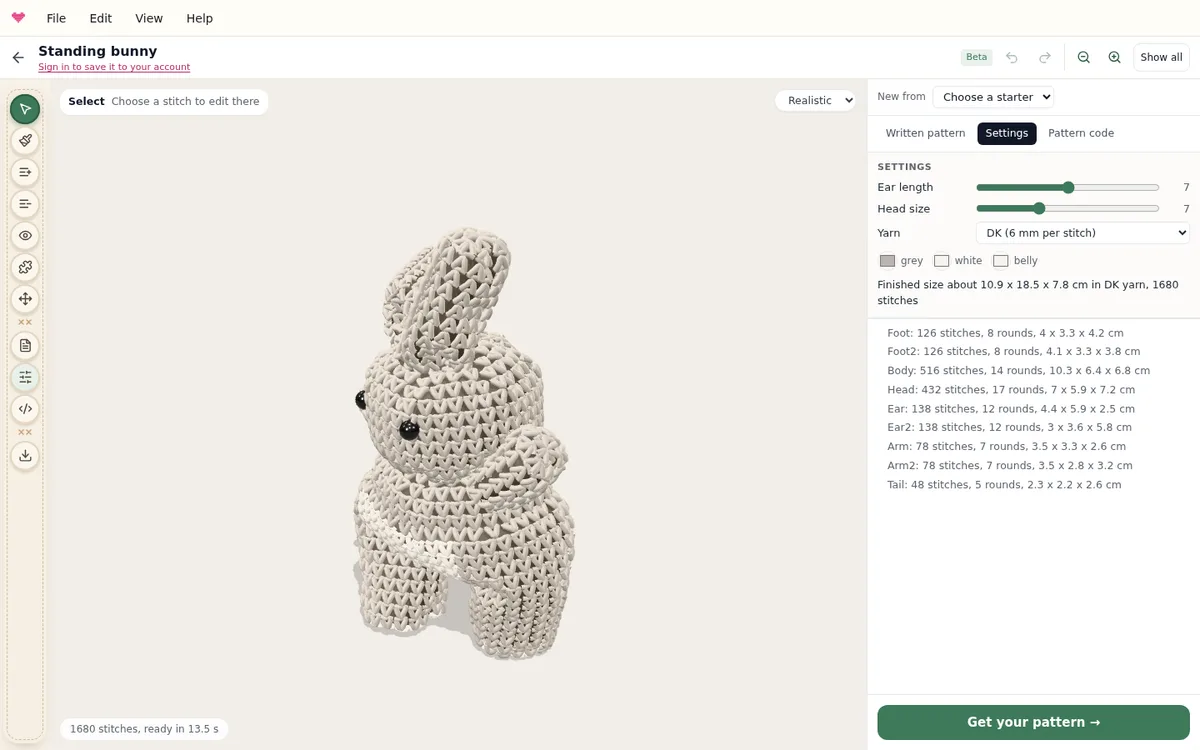
Gauge connects the pattern to the yarn and hook in your hands: how wide one single crochet is. In the amigurumi designer it sets the finished size of the toy, and the pattern tells you which hook and yarn it was planned for.
Choose the yarn
Open Settings and choose the yarn: thin (5 mm per stitch), DK (6 mm), worsted (7.5 mm) or chunky (10 mm). The line under it gives the finished size in centimetres and the number of stitches.
The same stitches make a bigger toy in thicker yarn. A bear that is 12 cm tall in DK is about 20 cm in chunky yarn, with exactly the same pattern. The written pattern names the yarn weight and a hook to go with it, and the estimated gauge in stitches and rounds per 10 cm.
Pieces written as a size, such as ball 7cm, work the other way round: they keep their size, and the stitch counts change with the yarn. Thinner yarn gives more stitches and more rounds.
Measure your own gauge
Crochet a small flat circle or a tube in single crochet with the yarn and hook you will use, about 10 cm across. Count the stitches over 10 cm and divide 10 by that number: 17 stitches over 10 cm is about 0.6 cm per stitch.
Choose the yarn in Settings that is closest to your measurement, and read the finished size again. If your stitches are a lot wider or narrower than every choice, change the hook first.
Check the size before you start
- Most amigurumi are crocheted tighter than a scarf: use a hook a size smaller than the yarn label suggests, so the stuffing does not show through.
- Stuffing firmly makes a piece a little rounder and taller than a light stuffing.
- If your gauge is far from the pattern’s, change the yarn or the hook rather than the counts: the proportions then stay as they are.
The designer simulates every stitch with the yarn, the stuffing and gravity, so its size is a close estimate. Your tension still changes the result a little, so crochet the first piece and measure it before you make the rest.
Continue with colour changes and stripes, building your own shapes, or the designer guide.
Try it yourself
The Knytstudio editor is free to use in your browser. No install, no signup needed to start.
Open the editor